
World Play Time - Control Your Playtime in Minecraft
12.9M downloads • Rank: #730
Description
World Play Time is the mod that shows the playtime in each Minecraft world. Enhance your gaming experience and download now.
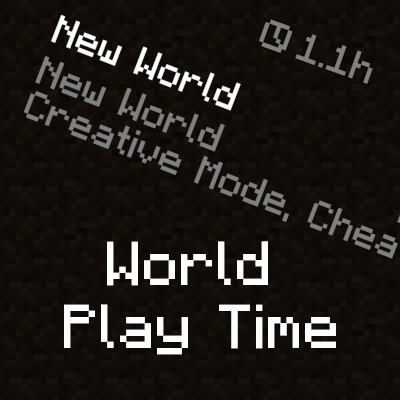
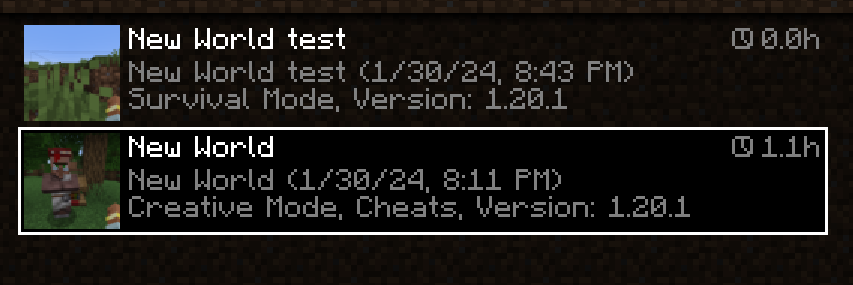
World Play Time is a mod for Minecraft that becomes an essential tool for all players who want to keep track of the time they have dedicated to each world. This mod displays the amount of time played on the world selection screen, right in the upper right corner of each entry. This way, you can see at a glance how much time you have invested in your adventures, even in worlds created before installing the mod.
One of the standout features of World Play Time is its simplicity and effectiveness. By checking the 'Play Time' statistic of each world, this mod provides accurate and updated information without the need for complicated settings. It is completely client-side, meaning it does not affect the server and works perfectly in any gaming environment, whether solo or multiplayer.
Installing World Play Time is quick and easy, allowing players to enjoy its benefits immediately. Additionally, it is compatible with most mods and versions of Minecraft, making it an ideal addition for any player looking to enhance their gaming experience. With this mod, you can better plan your gaming sessions and share your achievements with friends.
If you are a Minecraft enthusiast and want to keep a record of your adventures, downloading World Play Time is the perfect decision. This mod will not only help you manage your playtime but also allow you to reflect on your experiences in each world. Don't wait any longer and try this mod that will transform the way you play!
Screenshots1
Main File
[Fabric] World Play Time 1.2.4 - 26.1
Recent Files
View all →Minecraft 1.21
[NeoForge] World Play Time 1.2.4 - 1.21.10
[Fabric] World Play Time 1.2.4 - 1.21.10
[NeoForge] World Play Time 1.2.4 - 1.21.8
Minecraft 1.20
[Forge] World Play Time 1.2.3 - 1.20.1
[Fabric] World Play Time 1.2.3 - 1.20.1
[Forge] World Play Time 1.2.2 - 1.20.1
Frequently Asked Questions about World Play Time
How to install World Play Time?
To install World Play Time, you first need to have Minecraft with Forge/Fabric installed. Download the mod's .jar file and place it in the 'mods' folder of your Minecraft directory. Restart the game and the mod will be available.
What Minecraft versions is World Play Time compatible with?
World Play Time is compatible with Minecraft versions 26.1, 1.21.11, 1.21.10, 1.21.9, 1.21.8.
Is World Play Time free?
Yes, World Play Time is completely free. You can download it directly from this page or from CurseForge.
Comments (0)
Did it work for you?
Tell us which Minecraft version and which loader you used (Forge, Fabric, NeoForge, Quilt). If it crashed or clashed with another mod, say so here: you will save the next reader an afternoon.
Loading comments...
🔗 Related Mods

Powerful torches to prevent mob spawns around your home in a large area.

Be ready for overhauled anvils! Items stay, better name tags, many tweaks!

Create custom Ponder scenes with KubeJS.
JSON based item tweaking. Disable items, recipes, trades, creative tabs, JEI/REI/EMI, and more.
Speeds up the leaf decaying process
Refresh villager trades without needing to break workstations.
Explore the full category
Explore the full category
🚀 Create your Minecraft Server
Compatible with all mods
Statistics
Downloads
12.9M
Popular Ranking
#730
Information
Created
January 31, 2024
Updated
March 27, 2026
Authors
khajiitos