
Additional Banners - Customize Your Builds in Minecraft
11.3M downloads • Rank: #8221
Description
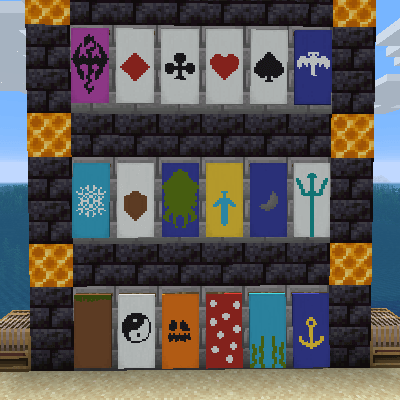
Additional Banners adds unique patterns to customize your banners in Minecraft. Download this mod and give a special touch to your builds.
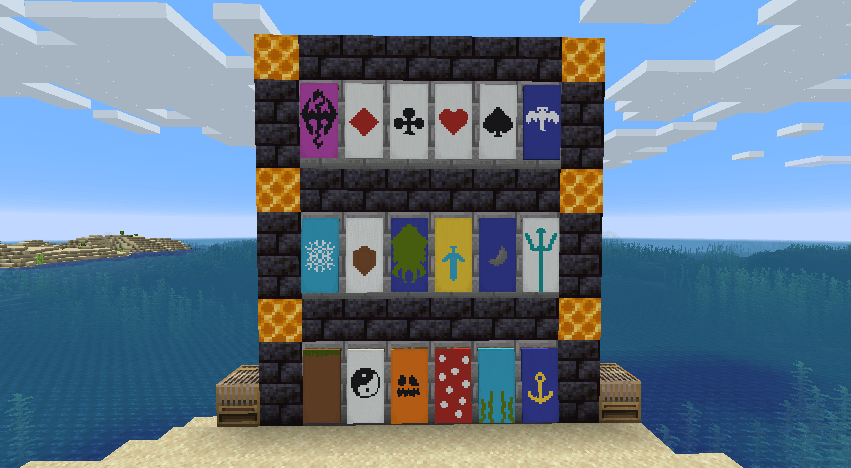
Additional Banners is a mod for Minecraft that transforms the way players can customize their builds by adding a variety of banner patterns. This mod is a must-have for those who want to give a unique touch to their creations, as it offers designs inspired by various game mechanics that enhance the aesthetics of any build.
To use the new patterns, you will need the loom block, where you can apply the designs by selecting the corresponding item. Many of these patterns are crafted through crafting recipes, while others are exclusive to trades with the wandering trader. Among the patterns you can create are designs like grass block, pumpkin, and even a dragon, each adding a distinctive style to your banners.
The craftable patterns require materials such as paper, scissors, and a template item in a recipe without a specific shape. It is important to mention that the scissors are not consumed in the process, although they will suffer wear. Additionally, the mod includes patterns that can only be obtained through trades with the wandering trader, such as diamonds, hearts, and game symbols, adding an element of exploration and trading to the game.
Compatible with the latest versions of Minecraft, Additional Banners integrates seamlessly into your gaming experience, whether in single-player mode or on multiplayer servers. This mod is perfect for both new players and veterans looking to enrich their world with unique and personalized details. Downloading Additional Banners is the first step to taking your builds to the next level and showcasing your creativity in the game.
🎥 Video
Screenshots1
Main File
AdditionalBanners-neoforge-MC26.3-26.3.0.1.jar
Recent Files
View all →Minecraft 1.20
AdditionalBanners-Fabric-1.20.4-17.0.4.jar
AdditionalBanners-NeoForge-1.20.4-17.0.4.jar
AdditionalBanners-Forge-1.20.4-17.0.4.jar
Frequently Asked Questions about Additional Banners
How to install Additional Banners?
To install Additional Banners, you first need to have Minecraft with Forge/Fabric installed. Download the mod's .jar file and place it in the 'mods' folder of your Minecraft directory. Restart the game and the mod will be available.
What Minecraft versions is Additional Banners compatible with?
Additional Banners is compatible with Minecraft versions 26.3, 26.2, 26.1.2, 26.1.1, 26.1.
Is Additional Banners free?
Yes, Additional Banners is completely free. You can download it directly from this page or from CurseForge.
Comments (0)
Did it work for you?
Tell us which Minecraft version and which loader you used (Forge, Fabric, NeoForge, Quilt). If it crashed or clashed with another mod, say so here: you will save the next reader an afternoon.
Loading comments...
🔗 Related Mods

No description
Displays the nearby world terrain, players, mobs, entities in the corner of your screen. Lets you create waypoints which help you find the locations you've marked.
![Loot Journal: Pickup Notifier [Forge Edition]](https://media.forgecdn.net/avatars/1740/153/639107826979479773.webp)
Ultimate item pick-up notifier featuring rich animations, full theming support, customizable layouts, and powerful filtering options!

Adds some useful information about food/hunger to the HUD

In-game Minecraft map editor - build bigger things more quickly!
A modding and testing toolkit with a few other minor utilities.
Explore the full category
Explore the full category
🚀 Create your Minecraft Server
Compatible with all mods
Statistics
Downloads
11.3M
Popular Ranking
#8221
Information
Created
May 4, 2015
Updated
September 27, 2026
Authors
DarkhaxDev