
Stylish Effects - Visual Enhancement of Effects in Minecraft
27.3M downloads • Rank: #575
Description
Stylish Effects transforms the display of effects in Minecraft with customizable options. Download this mod and style your game.
Stylish Effects is a mod for Minecraft that revolutionizes the way status effects are displayed in the game. This mod is a must-have for those who want a more stylish and organized experience, as it replaces the basic effects interface with a much more attractive and functional version. With multiple modes and configuration options, you can create the effect display of your dreams.
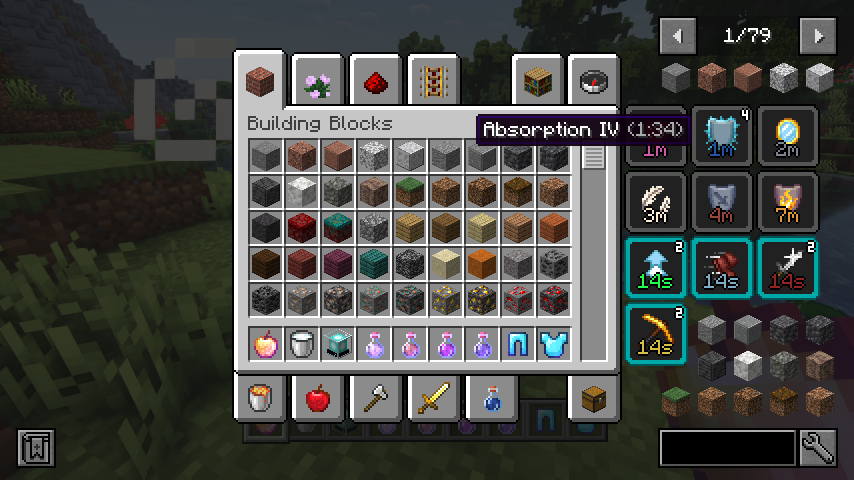
One of the standout features of Stylish Effects is its new compact design, which includes an effects timer and a visible effect amplifier. This not only enhances aesthetics but also allows more effects to be displayed without overlapping. Additionally, you can now see your active effects in any container, not just in your inventory, making it easier to keep track of your buffs at all times.
The mod also includes helpful tooltips that appear when hovering over effect icons, allowing you to quickly identify which effects you have active. If you use the Just Enough Effect Descriptions mod, the experience becomes even more enriching. Stylish Effects offers a wide variety of settings, such as screen position, number of rows and columns, and custom colors, allowing you to tailor the display to your personal style.
This mod is compatible with the latest versions of Minecraft and works on both Forge and Fabric, making it a versatile option for all players. Additionally, its compatibility with other mods like JEI and REI ensures that you won't have issues integrating it into your gaming experience. Downloading Stylish Effects is the first step to taking your Minecraft adventure to a new level of style and functionality.
If you're looking for a way to enhance the display of your effects in Minecraft, don't hesitate to try Stylish Effects. With its wide range of options and sleek design, this mod will surely make your gaming experience much more enjoyable and organized.
Screenshots14
Main File
v26.3.1-mc26.3.x+fabric
Recent Files
View all →Minecraft 1.21
[NEOFORGE] [1.21.1] StylishEffects-v21.1.3
[FABRIC] [1.21.1] StylishEffects-v21.1.3
Minecraft 1.20
[FABRIC] [1.20.1] StylishEffects-v8.0.4
[FORGE] [1.20.1] StylishEffects-v8.0.4
[FORGE] [1.20.1] StylishEffects-v8.0.3
Frequently Asked Questions about Stylish Effects
How to install Stylish Effects?
To install Stylish Effects, you first need to have Minecraft with Forge/Fabric installed. Download the mod's .jar file and place it in the 'mods' folder of your Minecraft directory. Restart the game and the mod will be available.
What Minecraft versions is Stylish Effects compatible with?
Stylish Effects is compatible with Minecraft versions 26.3, 26.2, 26.1.2, 26.1.1, 26.1.
Is Stylish Effects free?
Yes, Stylish Effects is completely free. You can download it directly from this page or from CurseForge.
Comments (0)
Did it work for you?
Tell us which Minecraft version and which loader you used (Forge, Fabric, NeoForge, Quilt). If it crashed or clashed with another mod, say so here: you will save the next reader an afternoon.
Loading comments...
🔗 Related Mods

Gives the Create World screen a makeover!
![Biome Music[Forge/Fabric]](https://media.forgecdn.net/avatars/793/361/638151205412587142.png)
change delay between music, more varied music, fix modded biomes not playing music

replaces the default weather with particle effects
Make your house a home!
A little decorative and functional mod
Adds new vanila styled paths and pavings!
Explore the full category
Explore the full category
🚀 Create your Minecraft Server
Compatible with all mods
Statistics
Downloads
27.3M
Popular Ranking
#575
Information
Created
November 2, 2021
Updated
September 29, 2026
Authors
Fuzs