
Sound Filters - Enhance Your Sound Experience in Minecraft
47.8M downloads • Rank: #1581
Description
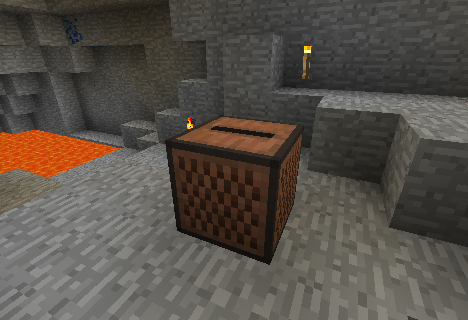
Sound Filters is a mod for Minecraft that transforms the game's sounds, adding effects like reverb and attenuation. Download it now!
Sound Filters is a mod for Minecraft that elevates the auditory experience of the game to the next level. This mod adds immersive sound effects, such as reverb in caves and sound attenuation when you are underwater or behind a wall. If you are a fan of immersion in video games, this mod is a must-have for you.
One of the standout features of Sound Filters is its ability to create a more realistic sound environment. When exploring caves, you will feel how the echoes of your footsteps and the sounds of mobs reflect off the walls, adding a layer of depth to your adventure. Additionally, when you dive into the water, you will notice that sounds are attenuated, simulating the real experience of being underwater.
This mod is easy to install and works perfectly on most versions of Minecraft. It is also compatible with other mods, meaning you won't have to worry about conflicts in your modpack. Installation is straightforward and does not require complicated settings, allowing players to enjoy their new features immediately.
Sound Filters is ideal for both solo players and those who enjoy the multiplayer experience. The atmosphere created by this mod can completely change the way you experience the game, making each adventure unique and exciting. Don't hesitate to download Sound Filters and immerse yourself in a richer and more immersive sound world.
🎥 Video
Main File
SoundFilters-0.14_for_1.16.2.jar
Recent Files
View all →Minecraft 1.16
SoundFilters-0.14_for_1.16.2.jar
SoundFilters-0.14_for_1.16.jar
Minecraft 1.15
SoundFilters-0.14_for_1.15.2.jar
SoundFilters-0.13_for_1.15.2.jar
Minecraft 1.14
SoundFilters-0.14_for_1.14.4.jar
SoundFilters-0.13_for_1.14.4.jar
Minecraft 1.12
SoundFilters-0.12.1_for_1.12.jar
SoundFilters-0.12_for_1.12.jar
SoundFilters-0.11_for_1.12.jar
Minecraft 1.11
SoundFilters-0.10_for_1.11.jar
SoundFilters-0.9_for_1.11.jar
Minecraft 1.9
SoundFilters-0.9 for 1.9.4 and 1.10
SoundFilters-0.9_for_1.9.jar
Minecraft 1.8
SoundFilters-0.8_for_1.8.X.jar
Minecraft 1.7
SoundFilters-0.8_for_1.7.X.jar
SoundFilters-0.7_for_1.7.X.jar
SoundFilters-0.6_for_1.7.X.jar
Minecraft 1.6
SoundFilters-0.7_for_1.6.X.jar
SoundFilters-0.6_for_1.6.X.jar
Frequently Asked Questions about Sound Filters
How to install Sound Filters?
To install Sound Filters, you first need to have Minecraft with Forge/Fabric installed. Download the mod's .jar file and place it in the 'mods' folder of your Minecraft directory. Restart the game and the mod will be available.
What Minecraft versions is Sound Filters compatible with?
Sound Filters is compatible with Minecraft versions 1.16.5, 1.16.4, 1.16.3, 1.16.2, 1.16.1.
Is Sound Filters free?
Yes, Sound Filters is completely free. You can download it directly from this page or from CurseForge.
Comments (0)
Did it work for you?
Tell us which Minecraft version and which loader you used (Forge, Fabric, NeoForge, Quilt). If it crashed or clashed with another mod, say so here: you will save the next reader an afternoon.
Loading comments...
🔗 Related Mods

With this Mod your Hotbar items will be visible on your Character.

A modification of Quark for the Rebirth of the Night (RotN) modpack.
Alters the fabric of Minecraft experience by weaving a tapestry of sound and visual effects
Cobblegens, Growth Crystals and Watering Cans oh my.

#enhancedphysics
Port of OpenBlocks Elevator.
Explore the full category
🚀 Create your Minecraft Server
Compatible with all mods
Statistics
Downloads
47.8M
Popular Ranking
#1581
Information
Created
July 27, 2014
Updated
March 10, 2021
Authors
Tmtravlr