
Server Browser - Easily Find Modified Servers
33.2M downloads • Rank: #719
Description
Server Browser is the perfect mod to find Minecraft servers. Connect to your favorite modpacks and play with other users.
Server Browser - In Game Server Listings is a mod for Minecraft that transforms the way players find servers for their favorite modpacks. This mod is essential for those seeking an enriched multiplayer gaming experience, as it facilitates connection to modified servers without complications. If you've ever felt lost searching for where to play, Server Browser is the solution you need.
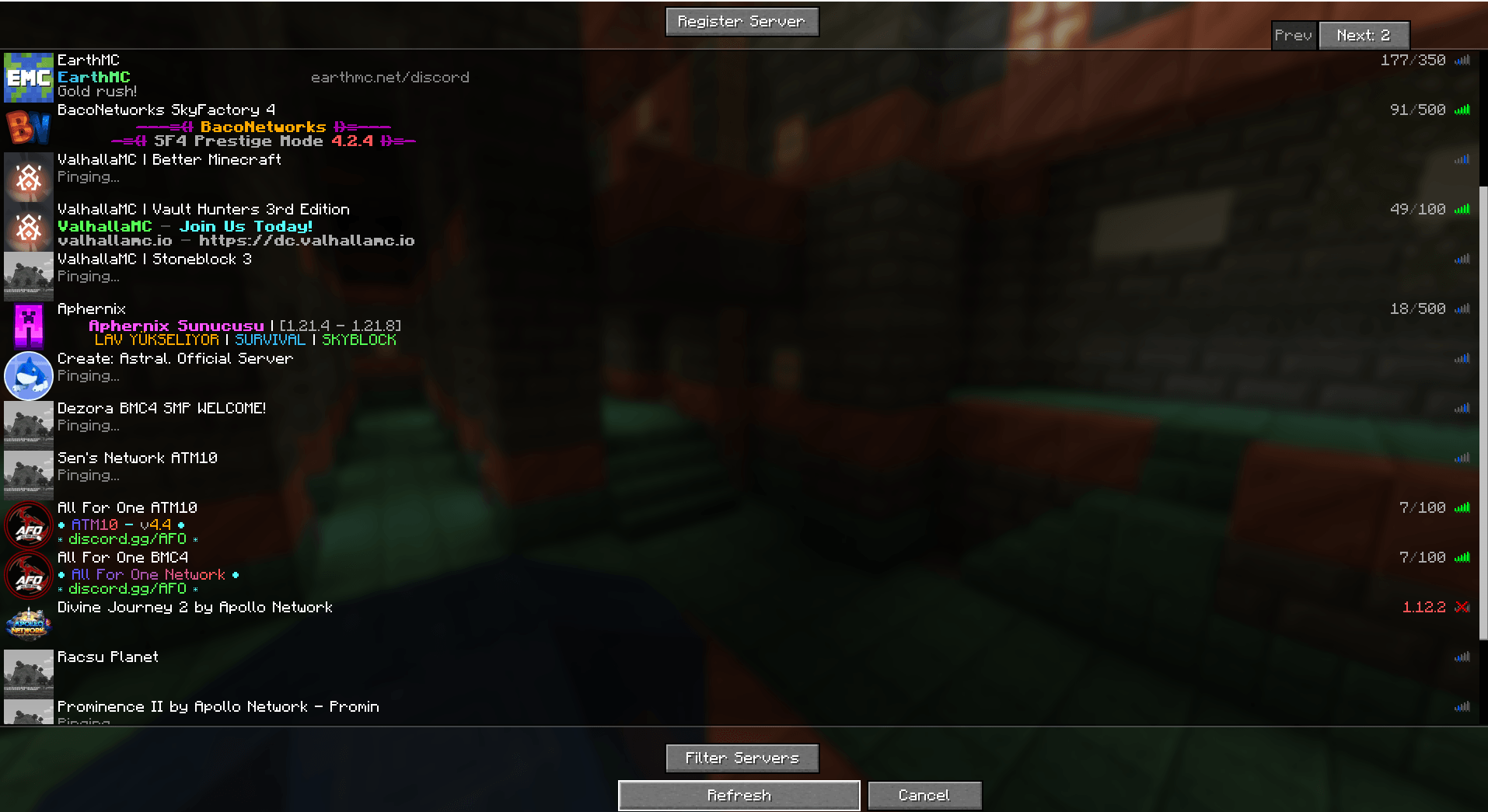
This mod features an intuitive interface that integrates directly into the game's multiplayer screen. By clicking on 'Server Browser', you can access a menu where you can filter servers according to different criteria. This means you can easily find servers that match your preferences, whether by modpack type, popularity, or specific features. Additionally, if you are a modpack author, this mod provides you with tools to effectively manage and promote your servers.
One of the standout features of Server Browser is the ability to add servers to a favorites list, allowing for quick and easy access in future gaming sessions. You can also set filters to exclude unwanted servers, ensuring that you only see those that truly interest you. This functionality is especially useful for players who want to avoid servers that do not meet their expectations.
Server Browser is compatible with most modpacks and is regularly updated to adapt to the latest versions of Minecraft. Furthermore, its design allows server owners to easily register their servers, fostering an active and growing community. Downloading Server Browser is an essential step for any player looking to maximize their experience in the world of Minecraft.
In conclusion, if you are looking for a mod that helps you connect with other players and enjoy your favorite modpacks, do not hesitate to download Server Browser. This mod not only simplifies the search for servers but also enriches your gaming experience by facilitating connection with the Minecraft community.
Screenshots2
Main File
serverbrowser-fabric-1.4.3-26.2.jar
Recent Files
View all →Minecraft 1.21
serverbrowser-fabric-1.4.3-1.21.1.jar
serverbrowser-fabric-1.4.2-1.21.1.jar
serverbrowser-neoforge-1.4.2-1.21.1.jar
Minecraft 1.20
ServerBrowser-1.20.1-FORGE-1.3.3.jar
ServerBrowser-1.20.1-FORGE-1.3.2.jar
ServerBrowser-1.20.1-FABRIC-1.3.1.jar
Frequently Asked Questions about Server Browser - In Game Server Listings
How to install Server Browser - In Game Server Listings?
To install Server Browser - In Game Server Listings, you first need to have Minecraft with Forge/Fabric installed. Download the mod's .jar file and place it in the 'mods' folder of your Minecraft directory. Restart the game and the mod will be available.
What Minecraft versions is Server Browser - In Game Server Listings compatible with?
Server Browser - In Game Server Listings is compatible with Minecraft versions 26.2, 26.1.2, 1.21.5, 1.21.2, 1.21.1.
Is Server Browser - In Game Server Listings free?
Yes, Server Browser - In Game Server Listings is completely free. You can download it directly from this page or from CurseForge.
Comments (0)
Did it work for you?
Tell us which Minecraft version and which loader you used (Forge, Fabric, NeoForge, Quilt). If it crashed or clashed with another mod, say so here: you will save the next reader an afternoon.
Loading comments...
🔗 Related Mods

Library mod for EvilCraft, Integrated Dynamics and others.

Removes the console spam from villager deaths
![Chunk Sending[Forge/Fabric]](https://media.forgecdn.net/avatars/782/744/638130016628532924.png)
Optimizes chunk packet delivery

An open source resource and data loader for Minecraft.

Adds the ability to claim chunks and make player parties, integrates with Xaero's Minimap and World Map
![Better chunk loading[Forge/Fabric]](https://media.forgecdn.net/avatars/861/519/638269254479355298.png)
Predicts player movement to pre-load chunks and increases chunk load speed
Explore the full category
Explore the full category
🚀 Create your Minecraft Server
Compatible with all mods
Statistics
Downloads
33.2M
Popular Ranking
#719
Information
Created
February 14, 2023
Updated
September 18, 2026
Authors
thethonk