
Save My Shaky Network - Stability in Your Minecraft Game
8.4M downloads • Rank: #1505

Description
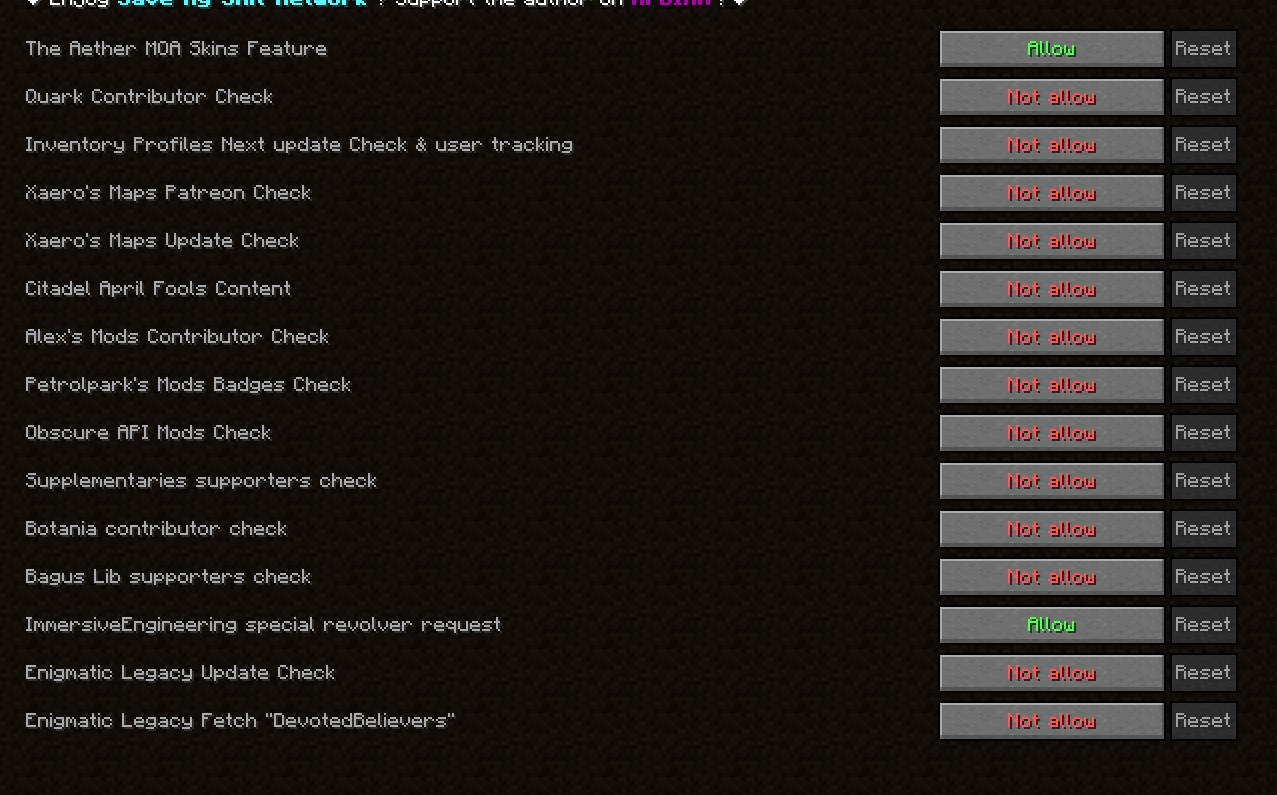
Save My Shaky Network blocks unnecessary connections, improving game stability. Ideal for regions with network censorship.
Save My Shaky Network is a mod for Minecraft that has become essential for players facing internet connection issues. This mod blocks network requests from common mods, preventing them from affecting game functionality and improving overall stability, especially in regions with strict internet censorship.
The main function of Save My Shaky Network is to prevent certain mods, like Quark, from attempting to connect to websites that may be blocked in some areas, such as Patreon or GitHub. These failed connections can cause the game to slow down or even crash during server startup or when joining a game. With this mod, you can enjoy a smoother and uninterrupted gaming experience.
Additionally, Save My Shaky Network is compatible with the latest versions of Minecraft and works on both Forge and Fabric. You can customize the settings to disable unnecessary update checks, giving you full control over your game's stability. This flexibility makes it ideal for players using multiple mods who want to avoid conflicts.
If you have experienced slow server startup or issues joining games due to failed connections, downloading Save My Shaky Network is the perfect solution. This mod not only improves stability but also allows you to enjoy your favorite mods without worries.
In conclusion, Save My Shaky Network is an essential tool for any Minecraft player looking to optimize their gaming experience. Don't let network issues ruin your adventures; try this mod and discover the difference it can make in your Minecraft world.
Screenshots1
Main File
smsn-neoforge-1.4.5-1.21.1.jar
Recent Files
View all →Minecraft 1.21
smsn-neoforge-1.4.5-1.21.1.jar
smsn-neoforge-1.4.4-1.21.1.jar
smsn-neoforge-1.4.3-1.21.1.jar
Minecraft 1.20
smsn-forge-1.4.3-1.20.1.jar
smsn-forge-1.4.2-1.20.1.jar
smsn-forge-1.4.1-1.20.1.jar
Frequently Asked Questions about Save My Shaky Network
How to install Save My Shaky Network?
To install Save My Shaky Network, you first need to have Minecraft with Forge/Fabric installed. Download the mod's .jar file and place it in the 'mods' folder of your Minecraft directory. Restart the game and the mod will be available.
What Minecraft versions is Save My Shaky Network compatible with?
Save My Shaky Network is compatible with Minecraft versions 1.21.1, 1.20.1, 1.19.2, 1.18.2.
Is Save My Shaky Network free?
Yes, Save My Shaky Network is completely free. You can download it directly from this page or from CurseForge.
Comments (0)
Did it work for you?
Tell us which Minecraft version and which loader you used (Forge, Fabric, NeoForge, Quilt). If it crashed or clashed with another mod, say so here: you will save the next reader an afternoon.
Loading comments...
🔗 Related Mods

Items stay inside of crafting tables and are also rendered on top. It's really fancy!
![[EMF] Entity Model Features [Fabric & Forge]](https://media.forgecdn.net/avatars/983/284/638491564386011875.png)
EMF is an, OptiFine format, Custom Entity Model replacement mod available for Fabric and Forge.
There, I fixed Minecraft for you. Various optional tweaks to improve Minecraft Quality of Life.

A Minecraft mod that improves the statistics screen and makes it more useful.
Removes arbitrary limits on Minecraft's attribute system.

Increase view distance without harming performance.
Explore the full category
Explore the full category
🚀 Create your Minecraft Server
Compatible with all mods
Statistics
Downloads
8.4M
Popular Ranking
#1505
Information
Created
October 28, 2024
Updated
September 12, 2026
Authors
im_gizmo