
Quick Skin - Customize Your Appearance in Minecraft Instantly
786.2K downloads • Rank: #4278
Description
Quick Skin revolutionizes character customization in Minecraft. Download this mod and express yourself with HD skins and animated capes.
Quick Skin is a mod for Minecraft that completely transforms the way you customize your character. This mod is a must-have for those who want total control over their appearance without having to leave the game. With Quick Skin, you can manage your skins and capes easily and quickly, making customization a fun part of your gaming experience.
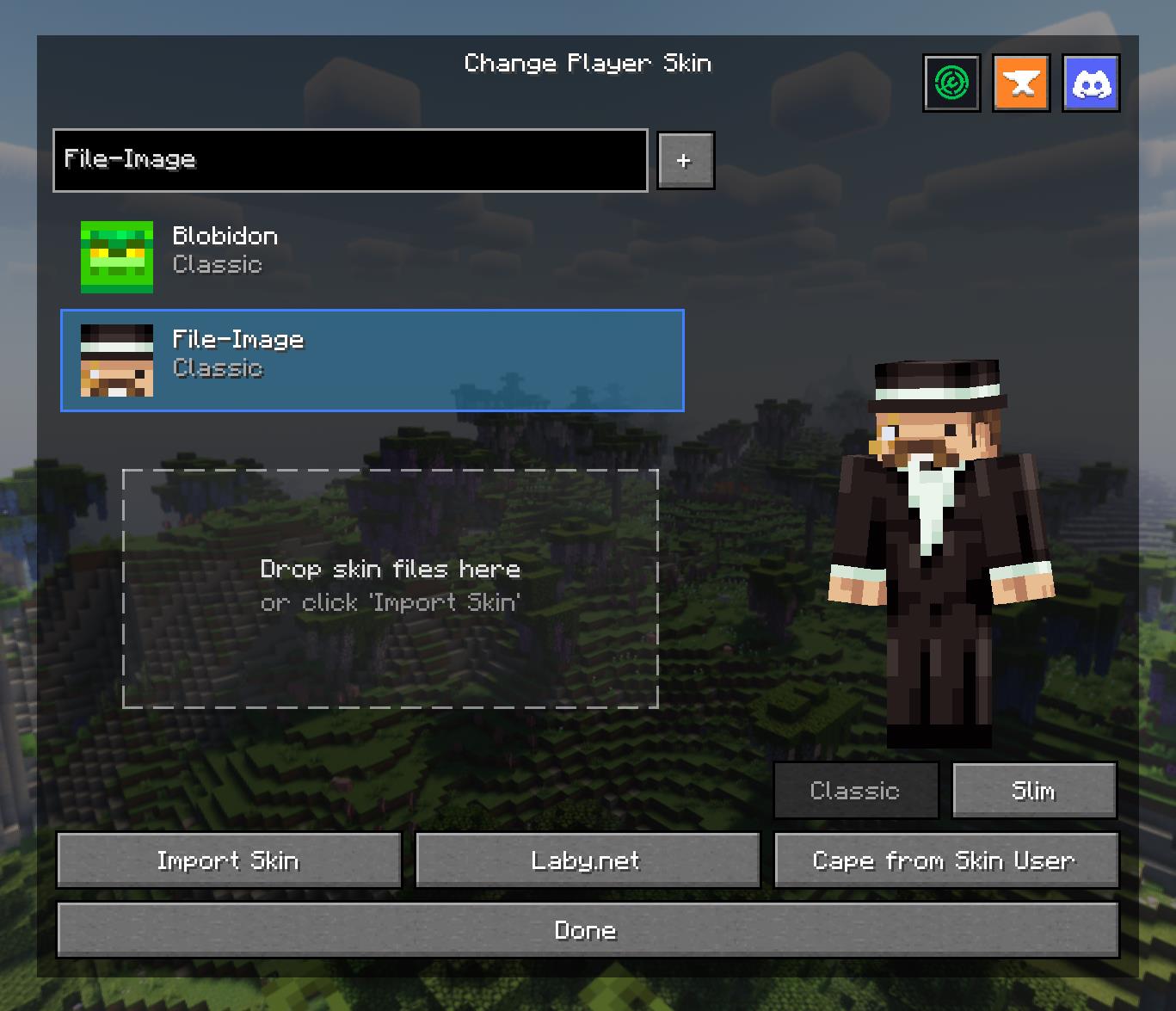
Among the standout features of Quick Skin is its intuitive skin management interface, accessible from the title or pause screen. You can save skins from other players, import your own files, and switch between classic and slim models with a simple click. Additionally, the high-definition texture engine allows you to use higher resolution skins, breaking the limitations of 64x64 pixels.
The ability to add animated capes is another strong point of this mod. Quick Skin allows you to use GIF files to create dynamic capes that stand out in the game. The mod takes care of processing these GIFs to ensure they look smooth and appealing. You can also adjust the playback speed of your animated capes, giving you total control over your visual style.
Quick Skin is fully compatible with Forge version 1.20.1 and offers complete support for multiplayer, syncing skin changes between players. Additionally, it stores your skins and capes locally, making management and access easy. With this mod, customizing your character becomes a smooth and exciting experience.
If you're looking for a way to stand out in the world of Minecraft and showcase your unique style, don't hesitate to download Quick Skin. This mod not only enhances your appearance but also enriches your gaming experience, allowing you to express yourself like never before.
🎥 Video
Screenshots7
Main File
Quick-Skin-26.3-v3.1.1 [NeoForge]
Recent Files
View all →Minecraft 1.21
Quick-Skin-1.21.8-v3.1.1 [NeoForge]
Quick-Skin-1.21.11-v3.1.1 [NeoForge]
Quick-Skin-1.21.9-v3.1.1 [NeoForge]
Minecraft 1.20
Quick-Skin-1.20.1-v3.1.1 [Forge]
Frequently Asked Questions about Quick Skin
How to install Quick Skin?
To install Quick Skin, you first need to have Minecraft with Forge/Fabric installed. Download the mod's .jar file and place it in the 'mods' folder of your Minecraft directory. Restart the game and the mod will be available.
What Minecraft versions is Quick Skin compatible with?
Quick Skin is compatible with Minecraft versions 26.3, 26.2, 26.1.2, 26.1.1, 26.1.
Is Quick Skin free?
Yes, Quick Skin is completely free. You can download it directly from this page or from CurseForge.
Comments (0)
Did it work for you?
Tell us which Minecraft version and which loader you used (Forge, Fabric, NeoForge, Quilt). If it crashed or clashed with another mod, say so here: you will save the next reader an afternoon.
Loading comments...
🔗 Related Mods
Inventory Tweaks for NeoForge
Break only the half of a double slab that you're looking at.
Increase view distance without harming performance.
A powerful, auto sync config library.

Create custom Ponder scenes with KubeJS.
An alternative way to get gunpowder, made from bat guano and sulfur ore
Explore the full category
Explore the full category
🚀 Create your Minecraft Server
Compatible with all mods
Statistics
Downloads
786.2K
Popular Ranking
#4278
Information
Created
August 14, 2025
Updated
October 12, 2026
Authors
ThePlum