
Notes - Your Notepad in Minecraft to Remember Everything
8.0M downloads • Rank: #5147
Description
Notes is the essential mod for Minecraft that adds a notepad in-game. Organize your ideas and don't miss important details.
Notes is a mod for Minecraft that transforms the way players organize their information within the game. With this mod, you can create and manage notes directly from the Minecraft interface, making it an essential tool for any adventurer looking to keep track of their discoveries, quests, or strategies.
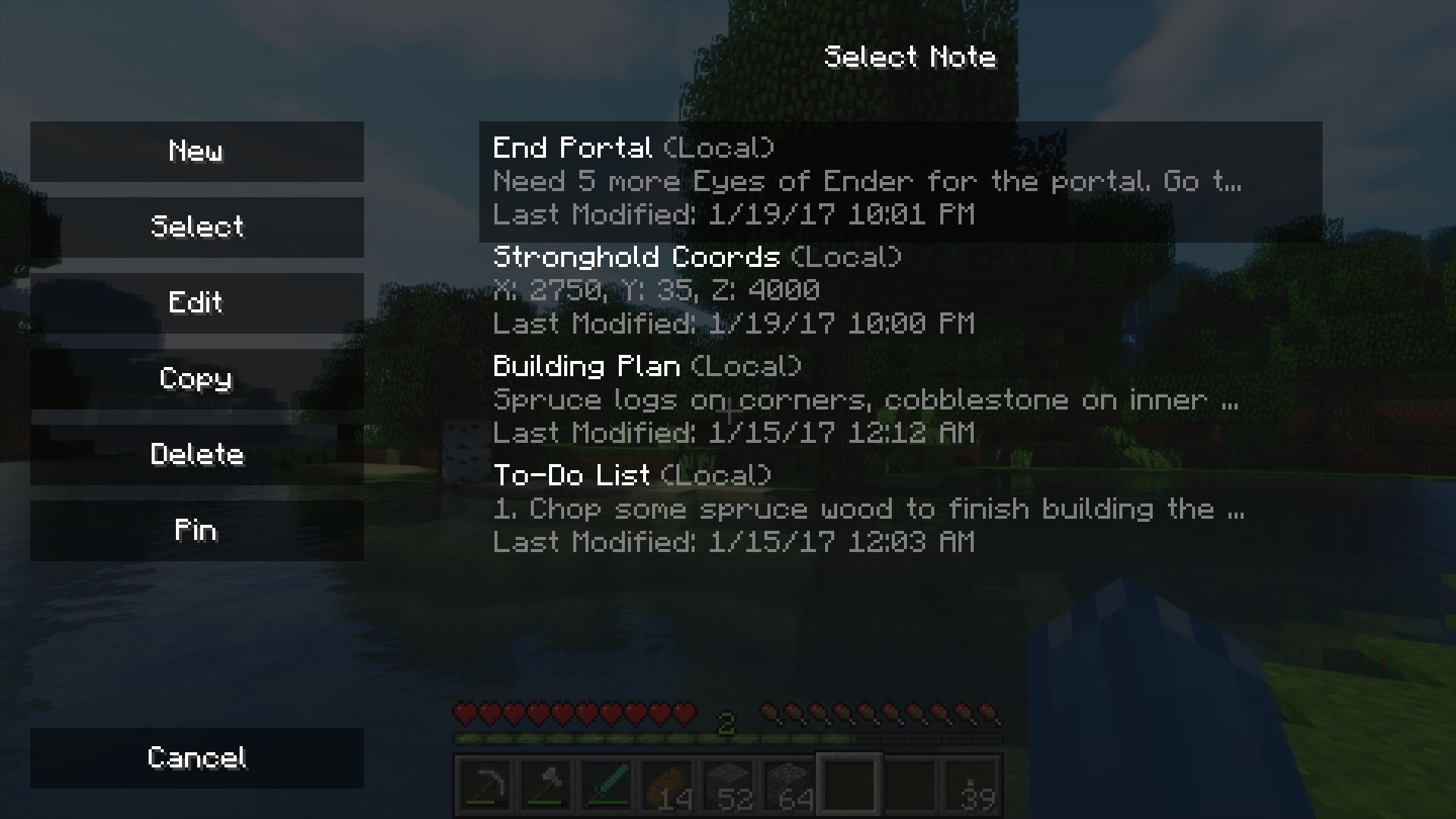
By pressing the 'N' key, an intuitive interface will open where you can see all the relevant notes for your current world or server. You can easily create and edit notes, ensuring that all important information is always at your fingertips. Additionally, you can save notes specifically by world, by server, or globally, allowing you to have complete control over your records.
One of the most useful features of Notes is the option to pin important notes in the HUD interface, which allows you to always have the information you need most visible. Whether you're exploring a new cave or building your base, having your notes in sight can make the difference between success and failure in your adventures.
This mod is compatible with most modpacks and does not interfere with standard Minecraft gameplay. Furthermore, its simple design ensures that it does not affect game performance, allowing you to enjoy a smooth experience while organizing your thoughts. Downloading Notes is a great way to enhance your gaming experience and ensure you never forget an important detail.
In conclusion, if you're looking for a way to keep your ideas and strategies organized while playing, don't hesitate to try Notes. This mod is a valuable addition that will help you maximize your time in Minecraft and enjoy your adventures even more. Download it and start jotting down everything you need!
🎥 Video
Screenshots4
Main File
Notes-26.3-3.2.0-neoforge.jar
Recent Files
View all →Minecraft 1.21
Notes-1.21.11-3.0.1-neoforge.jar
Notes-1.21.11-2.1.1-fabric.jar
Notes-1.21.10-3.0.1-neoforge.jar
Frequently Asked Questions about Notes
How to install Notes?
To install Notes, you first need to have Minecraft with Forge/Fabric installed. Download the mod's .jar file and place it in the 'mods' folder of your Minecraft directory. Restart the game and the mod will be available.
What Minecraft versions is Notes compatible with?
Notes is compatible with Minecraft versions 26.3, 26.2, 26.1.2, 26.1.1, 26.1.
Is Notes free?
Yes, Notes is completely free. You can download it directly from this page or from CurseForge.
Comments (0)
Did it work for you?
Tell us which Minecraft version and which loader you used (Forge, Fabric, NeoForge, Quilt). If it crashed or clashed with another mod, say so here: you will save the next reader an afternoon.
Loading comments...
🔗 Related Mods

Jade 🔍's additional mod supports for Neo/Forge

Adds some useful information about food/hunger to the HUD

JEI/REI/EMI plugin that displays information on all potion and status effects
![Small Ships [Fabric & Forge]](https://media.forgecdn.net/avatars/901/587/638349051640200134.png)
Vanilla friendly Ships for Minecraft. Now with cannons!
The Book of Books. Store every documentation book in one.

Data-driven minecraft in-game documentation with progress visualization.
Explore the full category
Explore the full category
🚀 Create your Minecraft Server
Compatible with all mods
Statistics
Downloads
8.0M
Popular Ranking
#5147
Information
Created
January 21, 2017
Updated
September 19, 2026
Authors
Chaosyr