
Fusion (Connected Textures) - Enhance Your Textures in Minecraft
109.2M downloads • Rank: #95

Description
Fusion is a mod for Minecraft that adds connected textures and custom models. Enhance your visual experience and download Fusion now.
Fusion (Connected Textures) is a mod for Minecraft that has become an essential tool for resource and mod developers. This mod offers advanced features such as connected textures and custom entity models, allowing creators to take their resource packs to the next level. If you are looking to enhance the aesthetics of your world, Fusion is the perfect solution.
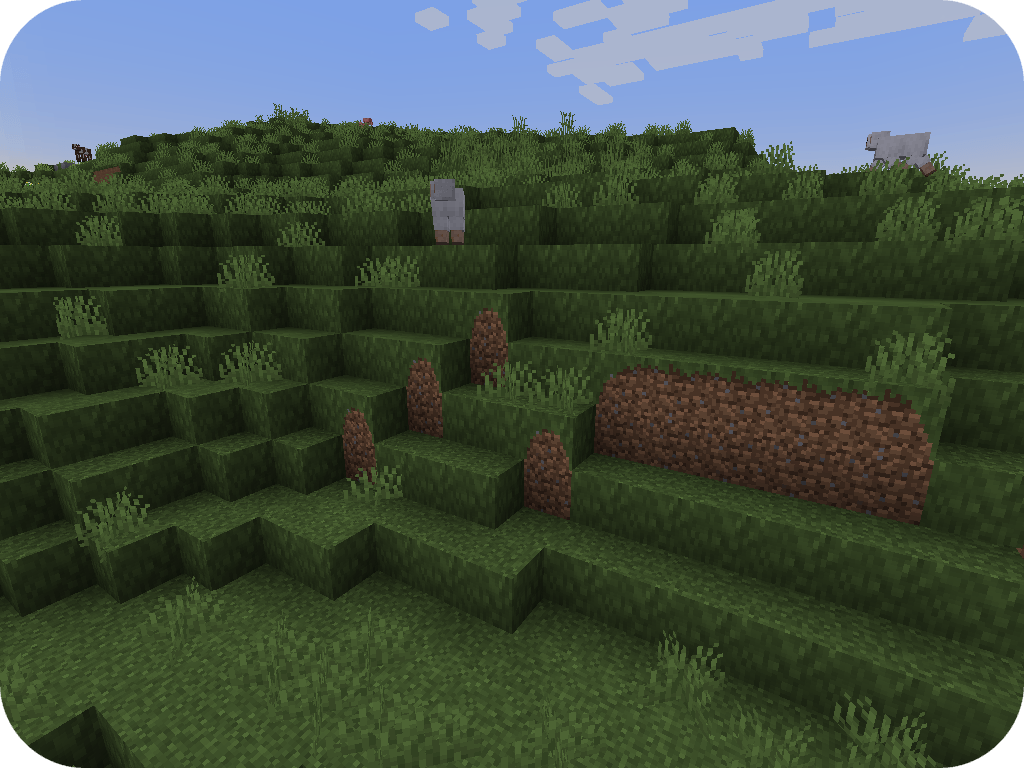
Among the standout features of Fusion are the connected textures, which allow blocks to visually join when adjacent, creating a more cohesive and appealing effect. Additionally, the mod includes continuous textures that span multiple blocks, enabling more elaborate and fluid designs. You can also take advantage of moving textures, which add dynamism to your builds, such as conveyor belts that move from one corner to another.
Fusion is compatible with both Forge and Fabric, making it a versatile option for any player. Resource pack developers can optionally integrate Fusion, making it easy to use in different environments. Furthermore, it is not necessary to install Fusion on the server, simplifying its implementation in multiplayer games.
With a wide range of options to customize textures and entity models, Fusion adapts to the needs of each creator. You can use custom entity models that change based on specific conditions, such as altitude or biome, adding an impressive level of detail to your builds. Downloading Fusion is the first step to transforming your experience in Minecraft and exploring new creative possibilities.
🎥 Video
Screenshots14
Main File
Fusion 1.3.16 for NeoForge 26.3
Recent Files
View all →Minecraft 1.21
Fusion 1.3.16 for NeoForge 1.21.11
Fusion 1.3.16 for NeoForge 1.21.9
Fusion 1.3.16 for NeoForge 1.21.8
Minecraft 1.20
Fusion 1.3.16 for NeoForge 1.20.6
Fusion 1.3.16 for NeoForge 1.20.4
Frequently Asked Questions about Fusion (Connected Textures)
How to install Fusion (Connected Textures)?
To install Fusion (Connected Textures), you first need to have Minecraft with Forge/Fabric installed. Download the mod's .jar file and place it in the 'mods' folder of your Minecraft directory. Restart the game and the mod will be available.
What Minecraft versions is Fusion (Connected Textures) compatible with?
Fusion (Connected Textures) is compatible with Minecraft versions 26.3, 26.2, 26.1.2, 26.1.1, 26.1.
Is Fusion (Connected Textures) free?
Yes, Fusion (Connected Textures) is completely free. You can download it directly from this page or from CurseForge.
Comments (0)
Did it work for you?
Tell us which Minecraft version and which loader you used (Forge, Fabric, NeoForge, Quilt). If it crashed or clashed with another mod, say so here: you will save the next reader an afternoon.
Loading comments...
🔗 Related Mods

a core mod
Searchables is a library mod that adds helper methods that allow for searching and filtering elements based on components, as well as offering built in auto-complete functionality.
![Iceberg [Neo/Forge]](https://media.forgecdn.net/avatars/425/207/637653794535451378.png)
A modding library that contains new events, helpers, and utilities to make modder's lives easier.

Fabric language module for Kotlin
A library mod containing code used across Corgi Taco's mods.
A common library powering all of MrCrayfish's Mods
Explore the full category
Explore the full category
🚀 Create your Minecraft Server
Compatible with all mods
Statistics
Downloads
109.2M
Popular Ranking
#95
Information
Created
June 19, 2023
Updated
October 5, 2026
Authors
SuperMartijn642