
Extended Terminal - The All-in-One Terminal for Minecraft
195.4K downloads • Rank: #11432
Description
Extended Terminal is the essential mod to optimize your crafting in Minecraft. Download and transform your gaming experience.
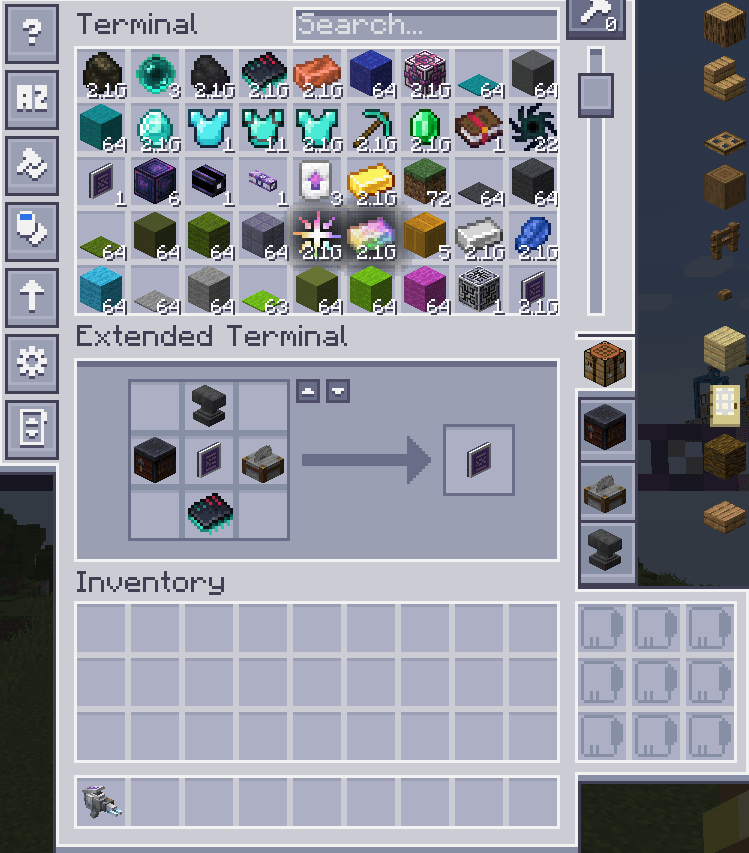
Extended Terminal is a mod for Minecraft that takes the crafting experience to a new level. This mod is essential for any player using Applied Energistics 2, as it integrates multiple functions into a single terminal. With Extended Terminal, you can perform crafting, smelting, stone cutting, and more, all from a single interface, greatly simplifying your adventures in the game.
One of the standout features of Extended Terminal is its support for EMI and JEI, allowing you to access recipes and items quickly and efficiently. Additionally, this mod enables the use of an extended crafting system that goes beyond the traditional 3x3, allowing for custom configurations that fit your needs. This is ideal for those looking to maximize their efficiency in crafting and creating complex items.
Extended Terminal is compatible with a variety of Minecraft versions and integrates seamlessly with other mods, such as Avaritia and Extended Crafting. Its intuitive design and advanced functionality ensure you can manage your resources and create items without complications. Moreover, it is fully functional on multiplayer servers, allowing all players to enjoy its benefits.
If you are looking for a way to optimize your crafting experience in Minecraft, don't hesitate to download Extended Terminal. This mod is a powerful tool that will transform the way you interact with the Minecraft world, making it more accessible and fun. Don't wait any longer and enhance your game today!
Screenshots6
Main File
ExtendedTerminal-1.20.1-15.1.0
Recent Files
View all →Minecraft 1.21
ExtendedTerminal-1.21.1-19.1.0
ExtendedTerminal-1.21.1-19.0.4
ExtendedTerminal-1.21.1-19.0.3
Minecraft 1.20
ExtendedTerminal-1.20.1-15.1.0
ExtendedTerminal-1.20.1-15.0.4
ExtendedTerminal-1.20.1-15.0.3
Frequently Asked Questions about Extended Terminal
How to install Extended Terminal?
To install Extended Terminal, you first need to have Minecraft with Forge/Fabric installed. Download the mod's .jar file and place it in the 'mods' folder of your Minecraft directory. Restart the game and the mod will be available.
What Minecraft versions is Extended Terminal compatible with?
Extended Terminal is compatible with Minecraft versions 1.21.1, 1.20.1.
Is Extended Terminal free?
Yes, Extended Terminal is completely free. You can download it directly from this page or from CurseForge.
Comments (0)
Did it work for you?
Tell us which Minecraft version and which loader you used (Forge, Fabric, NeoForge, Quilt). If it crashed or clashed with another mod, say so here: you will save the next reader an afternoon.
Loading comments...
🔗 Related Mods
ME Greater Accumulation: For when kilobytes just won't do.

Adds some QoL contents for AE2
mana through ae2, what could go wrong

A guidebook toolkit for mods and modpack makers alike with comfortable markdown formatting, and live 3d scenes!
give Applied Energistics 2 add a crafting tree

Re-introduces JEI compatibility for Applied Energetics 2
Explore the full category
Explore the full category
🚀 Create your Minecraft Server
Compatible with all mods
Statistics
Downloads
195.4K
Popular Ranking
#11432
Information
Created
July 7, 2025
Updated
September 23, 2026
Authors
myogoo