
Equipment Compare [Neo/Forge] - Easily Compare Gear
50.5M downloads • Rank: #559
![Equipment Compare [Neo/Forge]](https://media.forgecdn.net/avatars/476/686/637770200277803086.png)
Description
Equipment Compare is a mod for Minecraft that makes gear comparison easy. Download and optimize your gaming experience.
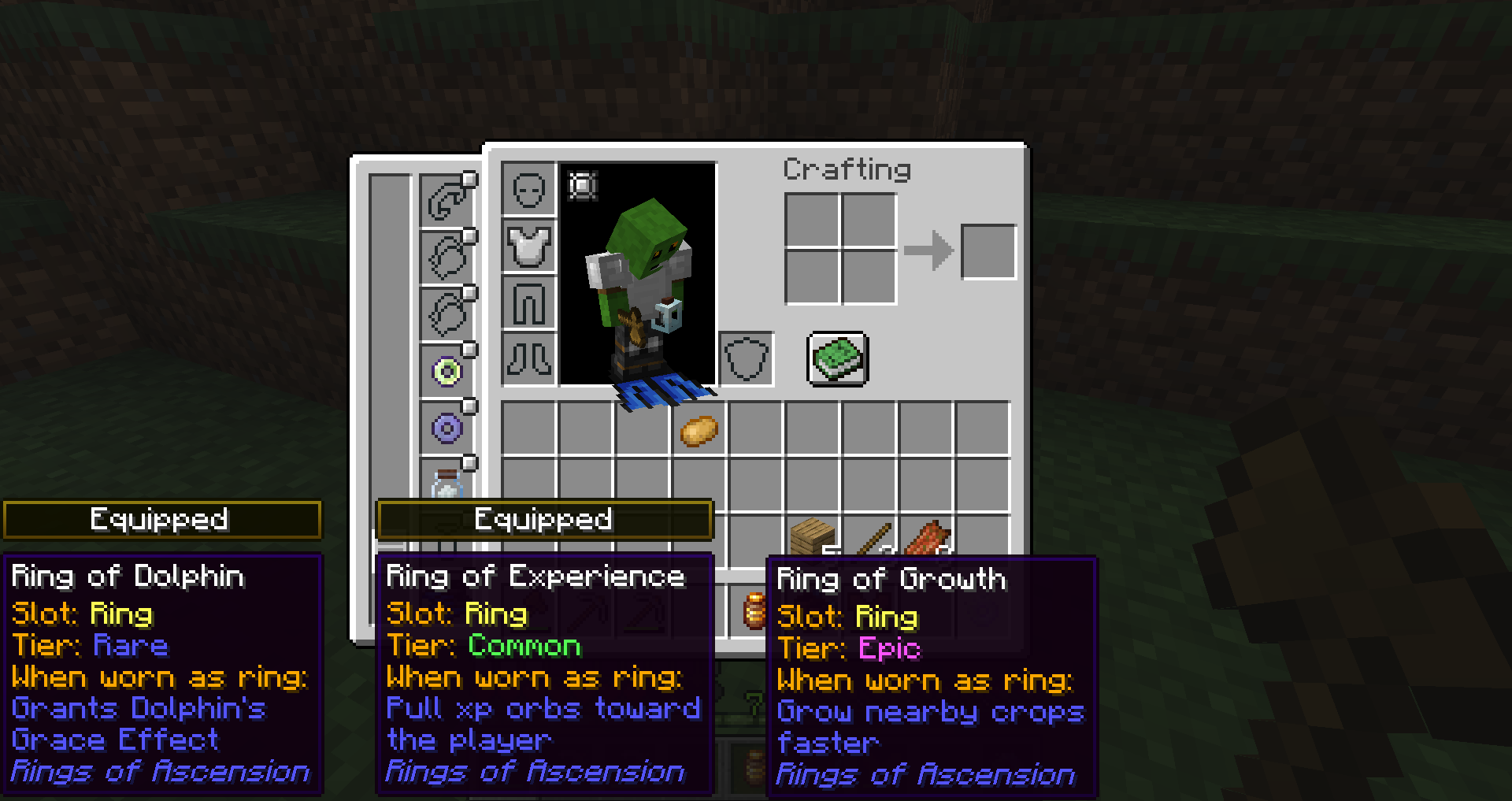
Equipment Compare [Neo/Forge] is a mod for Minecraft that transforms the way players compare their gear. This mod is essential for those playing in environments with multiple mods, as it allows you to quickly and easily view the stats of the items you have equipped compared to those you are considering. By simply hovering over an item, you can instantly see how it compares to your current gear, helping you make more informed decisions.
One of the standout features of Equipment Compare is its intuitive interface. Unlike other comparison mods that only show basic information, this mod offers a tooltip that displays the stats of what you are wearing alongside those of the item you are evaluating. This means you can see at a glance if a new item is better or worse than what you already have equipped, which is especially useful in an environment filled with unique and varied items.
The mod's configuration is highly customizable. By default, you can activate the comparison by holding down the Shift key while hovering over an item. However, you can also change this setting in the controls menu, allowing comparisons to be displayed constantly or only when you wish. Additionally, you can adjust the colors and texts of the labels indicating which item is equipped, further enhancing the visual experience.
This mod is fully compatible with most Minecraft mods and works optimally on multiplayer servers. It is important to mention that for some versions, you will need to have Iceberg installed, which ensures greater compatibility with new stats and features added by other mods. This way, you can enjoy a smoother and more enriching gaming experience.
If you are looking to improve your gaming experience and make managing your gear easier, downloading Equipment Compare is an excellent decision. This mod will not only save you time but also allow you to optimize your strategy in the game. Don't hesitate to try it and take your Minecraft adventure to the next level!
Screenshots3
Main File
EquipmentCompare-1.21.1-forge-1.3.13.jar
Recent Files
View all →Minecraft 1.21
EquipmentCompare-1.21.1-forge-1.3.13.jar
EquipmentCompare-1.21.1-neoforge-1.3.13.jar
EquipmentCompare-1.21.4-forge-1.3.12.jar
Minecraft 1.20
EquipmentCompare-1.20.6-forge-1.3.10.jar
EquipmentCompare-1.20.6-forge-1.3.9.jar
EquipmentCompare-1.20.2-forge-1.3.7.jar
Minecraft 1.19
EquipmentCompare-1.19.4-forge-1.3.5.jar
Frequently Asked Questions about Equipment Compare [Neo/Forge]
How to install Equipment Compare [Neo/Forge]?
To install Equipment Compare [Neo/Forge], you first need to have Minecraft with Forge/Fabric installed. Download the mod's .jar file and place it in the 'mods' folder of your Minecraft directory. Restart the game and the mod will be available.
What Minecraft versions is Equipment Compare [Neo/Forge] compatible with?
Equipment Compare [Neo/Forge] is compatible with Minecraft versions 1.21.4, 1.21.3, 1.21.1, 1.21, 1.20.6.
Is Equipment Compare [Neo/Forge] free?
Yes, Equipment Compare [Neo/Forge] is completely free. You can download it directly from this page or from CurseForge.
Comments (0)
Did it work for you?
Tell us which Minecraft version and which loader you used (Forge, Fabric, NeoForge, Quilt). If it crashed or clashed with another mod, say so here: you will save the next reader an afternoon.
Loading comments...
🔗 Related Mods

Customize Minecraft's menus with ease!
Reduce GPU and CPU usage automatically when no user operation exists.

Unofficial Fork of "Iris", made to work with FML

An open source library for other mods!

Enhances inventory management by adding various functions to the mouse buttons.

A simple currency/economy mod that allows you to safely trade in a multiplayer environment.
Explore the full category
Explore the full category
🚀 Create your Minecraft Server
Compatible with all mods
Statistics
Downloads
50.5M
Popular Ranking
#559
Information
Created
July 11, 2021
Updated
April 1, 2025
Authors
Grend_G