
Create Big Cannons - Unleash the Power of Big Cannons!
24.2M downloads • Rank: #634

Description
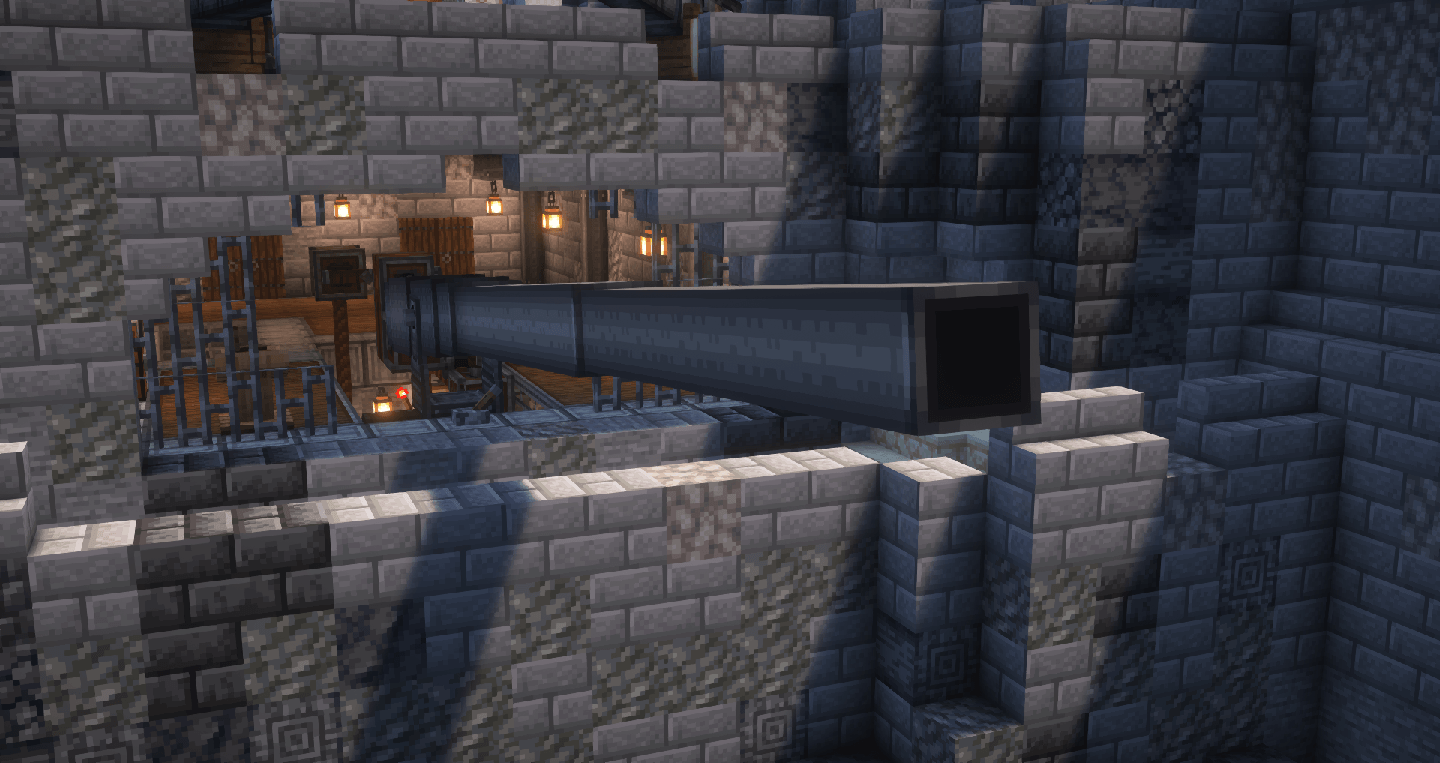
Create Big Cannons is a mod for Minecraft that allows you to build giant cannons with powerful projectiles. Download and dominate the battlefield!
Create Big Cannons is an exciting mod for Minecraft that transforms the way players can interact in combat. This addon for the popular mod Create allows players to build giant cannons that are not only visually impressive but also devastating on the battlefield. If you love strategy and action, this mod is a must-have to take your adventures to a new level.
Among the standout features of Create Big Cannons are the multiblock cannons, which can be built with a variety of cannon blocks made from different materials and tiers. Additionally, the mod includes automatic cannons that allow for a faster rate of fire and a variety of capabilities. With a wide range of projectiles at your disposal, you can unleash chaos on enemy bases and protect your own treasures.
The operation of the mod is intuitive, as it uses the kinetic system of Create to load and aim the cannons. It also includes different types of fuses to activate projectiles in various ways, adding an extra level of strategy to your attacks. Customization is key, and the mod offers many configuration options to suit your play style.
Create Big Cannons is especially useful on multiplayer servers, where you can use these powerful cannons to smash through your opponents' defenses. To make the most of this mod, you will need to have Create installed along with an additional mod that adds materials like bronze and steel, such as IngotCraft. This ensures you can access all the necessary resources to build your cannons.
In conclusion, if you're looking for an exciting way to enrich your gameplay in Minecraft, don't hesitate to download Create Big Cannons. This mod not only adds a new dimension to combat but also fosters creativity in building. Join the battle and show your power with these impressive cannons!
🎥 Video
Screenshots4
Main File
Create Big Cannons v5.11.7 for NeoForge 1.21.1, Create v6.0.7+
Recent Files
View all →Minecraft 1.21
Create Big Cannons v5.11.7 for NeoForge 1.21.1, Create v6.0.7+
Create Big Cannons v5.11.6 for NeoForge 1.21.1, Create v6.0.7+
Create Big Cannons v5.11.5 for NeoForge 1.21.1, Create v6.0.7+
Minecraft 1.20
Create Big Cannons v5.11.4 for Forge 1.20.1, Create v6.0.7+
Create Big Cannons v5.11.4 for Fabric 1.20.1, Create v6.0.7+
Create Big Cannons v5.11.3 for Forge 1.20.1, Create v6.0.7
Frequently Asked Questions about Create Big Cannons
How to install Create Big Cannons?
To install Create Big Cannons, you first need to have Minecraft with Forge/Fabric installed. Download the mod's .jar file and place it in the 'mods' folder of your Minecraft directory. Restart the game and the mod will be available.
What Minecraft versions is Create Big Cannons compatible with?
Create Big Cannons is compatible with Minecraft versions 1.21.1, 1.20.1, 1.19.2, 1.18.2.
Is Create Big Cannons free?
Yes, Create Big Cannons is completely free. You can download it directly from this page or from CurseForge.
Comments (0)
Did it work for you?
Tell us which Minecraft version and which loader you used (Forge, Fabric, NeoForge, Quilt). If it crashed or clashed with another mod, say so here: you will save the next reader an afternoon.
Loading comments...
🔗 Related Mods
Automatic Enchanting, with Create.
Industrial decoration themed for the Create mod.
A small Create addon I made for my Create-focused vanilla+ modpack, Create+.

An addon mod for Create Stuff & Additions & Create to display the player's fuel and water levels.
A simple Create attachment that enables custom block entity configurations and can be configured to fix certain exploits related to both the core Create mod and its add-ons.
A mod for fix all schematic problem from Create and addon!
Explore the full category
Explore the full category
🚀 Create your Minecraft Server
Compatible with all mods
Statistics
Downloads
24.2M
Popular Ranking
#634
Information
Created
July 24, 2022
Updated
September 26, 2026
Authors
rbasamoyai