
Corpse - Recover Your Items After Death in Minecraft
135.1M downloads • Rank: #120
Description
The Corpse mod allows you to recover all your items after dying in Minecraft. Download this mod and never lose your items again!
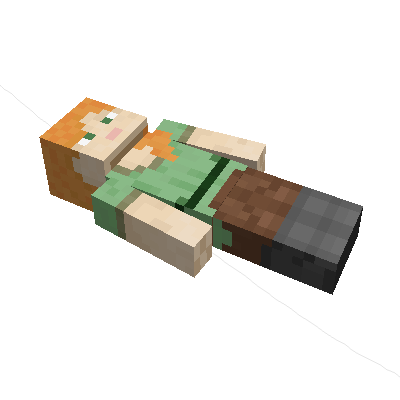
The Corpse mod is an essential addition for any Minecraft player looking to enhance their gaming experience. This mod for Minecraft introduces a system that allows a corpse to appear at your death location, containing all the items you had in your inventory. With Corpse, you no longer have to worry about losing your precious items after an unfortunate encounter with an enemy or a fatal fall.
One of the standout features of Corpse is that the corpse will retain your skin, making it even more personal. You can access the items from the corpse by right-clicking on it, and the best part is that it can hold an infinite amount of items. Once you have retrieved all your items, the corpse will disappear, ensuring that your world doesn't become cluttered with lifeless bodies.
Additionally, Corpse offers a death history feature that you can check by pressing the 'U' key. This allows you to see all your past deaths and, if you are in creative mode, recover lost items. You can also teleport to your death location through a command in the history, making it easier to find your items if you can't locate them immediately.
The mod is highly configurable, allowing options such as who can access the corpse's inventory and how long it takes to turn into a skeleton. This means you can customize the experience to suit your preferences and play style. Furthermore, Corpse is compatible with other mods, making it a versatile choice for any player.
In conclusion, if you want to enhance your experience in Minecraft and ensure that your items never get lost, downloading Corpse is a smart decision. This mod not only adds a layer of realism but also provides a practical solution to the frustration that death can cause in the game. Don't hesitate to try it and enjoy a new way to play!
🎥 Video
Main File
[NEOFORGE][26.3] Corpse 1.1.22+26.3
Recent Files
View all →Minecraft 1.21
[NEOFORGE][1.21.11] Corpse 1.21.11-1.1.22
[NEOFORGE][1.21.1] Corpse 1.21.1-1.1.22
[NEOFORGE][1.21.11] Corpse 1.21.11-1.1.21
Frequently Asked Questions about Corpse
How to install Corpse?
To install Corpse, you first need to have Minecraft with Forge/Fabric installed. Download the mod's .jar file and place it in the 'mods' folder of your Minecraft directory. Restart the game and the mod will be available.
What Minecraft versions is Corpse compatible with?
Corpse is compatible with Minecraft versions 26.3, 26.2, 26.1.2, 26.1.1, 26.1.
Is Corpse free?
Yes, Corpse is completely free. You can download it directly from this page or from CurseForge.
Comments (0)
Did it work for you?
Tell us which Minecraft version and which loader you used (Forge, Fabric, NeoForge, Quilt). If it crashed or clashed with another mod, say so here: you will save the next reader an afternoon.
Loading comments...
🔗 Related Mods
A Lightweight Library

An open source library for other mods!
![Eating Animation [Neo/Forge]](https://media.forgecdn.net/avatars/483/224/637782958702187625.gif)
A Neo/Forge port of the Eating Animation mod

A Minecraft lib used for all of CreeperHosts mods

Vanilla+ additions: Jars, signposts, faucets, weather vanes spring launchers, sconces, planters, lights, decoration and automation

Improve performance when Minecraft is in the background
Explore the full category
Explore the full category
🚀 Create your Minecraft Server
Compatible with all mods
Statistics
Downloads
135.1M
Popular Ranking
#120
Information
Created
March 6, 2019
Updated
October 22, 2026
Authors
henkelmax