
Chat Emotes - Express Your Emotions in Minecraft
4.7M downloads • Rank: #16963
Description
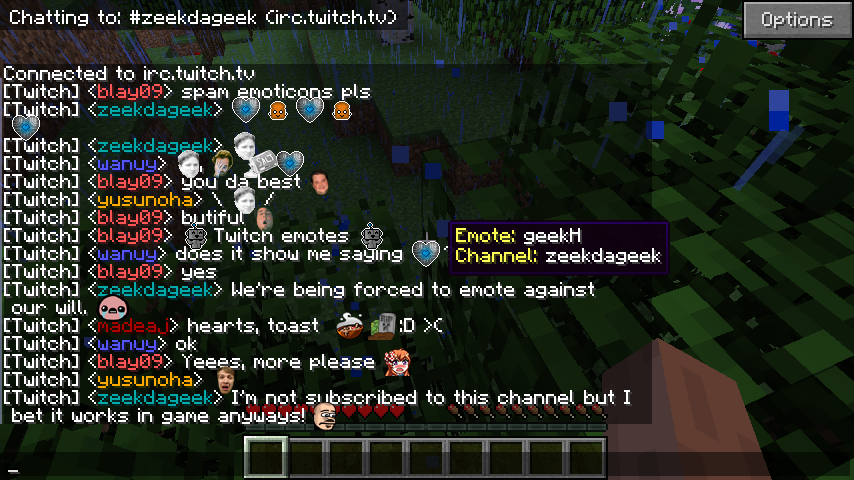
Chat Emotes (formerly EiraMoticons) adds emoticons to Minecraft chat. Enhance your communication and fun in the game.
Chat Emotes (formerly EiraMoticons) is a mod for Minecraft that transforms the way you communicate in the game by adding emoticons to the chat. This mod is a must-have for those who want to express their emotions and reactions in a more fun and visual way. With Chat Emotes, each message can be accompanied by popular emoticons, adding a special touch to your interactions with friends and other players.
Among the standout features of this mod are the integration of global Twitch emoticons, as well as subscriber emoticons that you can enable in the settings. Additionally, the mod supports BTTV and FFZ emoticons, meaning you can further customize your chat experience. Imagine being able to use emoticons like Kappa or PogChamp while playing, making every conversation more dynamic and entertaining.
However, it is important to mention that currently this mod is not working due to changes in the remote API. The developers are working on an update to make it compatible with modern versions of Minecraft. This means that, although you cannot enjoy its features at this moment, it is a mod worth keeping on your radar for the future.
Chat Emotes is compatible with various versions of Minecraft and easily integrates into your gaming experience. Although it is not available right now, its potential to enrich communication in the game is undeniable. When it becomes available again, downloading Chat Emotes will be an excellent way to enhance your gaming sessions and make them more interactive.
In conclusion, if you are looking for a fun way to express yourself in Minecraft, be sure to keep an eye out for updates on Chat Emotes. This mod has the potential to change the way you interact with other players, so get ready to download it as soon as it becomes available and take your chat experience to the next level.
🎥 Video
Screenshots1
Main File
EiraMoticons_1.12.2-6.4.0.jar
Recent Files
View all →Minecraft 1.12
EiraMoticons_1.12.2-6.4.0.jar
EiraMoticons_1.12-6.3.4.jar
EiraMoticons_1.12-6.2.1.jar
Minecraft 1.11
EiraMoticons v5.2.1 for Minecraft 1.11.x
Minecraft 1.10
EiraMoticons_1.10.2-4.3.6.jar
EiraMoticons_1.10.2-4.2.4.jar
EiraMoticons_1.10.2-4.2.3.jar
Minecraft 1.8
eiramoticons-mc1.8.9-3.2.4.jar
eiramoticons-mc1.8.9-3.2.3.jar
eiramoticons-mc1.8.8-3.2.1.jar
Minecraft 1.7
EiraMoticons_1.7.10-1.3.88.jar
EiraMoticons_1.7.10-1.3.87.jar
eiramoticons-mc1.7.10-1.2.85-final.jar
Frequently Asked Questions about Chat Emotes (formerly EiraMoticons)
How to install Chat Emotes (formerly EiraMoticons)?
To install Chat Emotes (formerly EiraMoticons), you first need to have Minecraft with Forge/Fabric installed. Download the mod's .jar file and place it in the 'mods' folder of your Minecraft directory. Restart the game and the mod will be available.
What Minecraft versions is Chat Emotes (formerly EiraMoticons) compatible with?
Chat Emotes (formerly EiraMoticons) is compatible with Minecraft versions 1.12.2, 1.12.1, 1.12, 1.11.2, 1.11.
Is Chat Emotes (formerly EiraMoticons) free?
Yes, Chat Emotes (formerly EiraMoticons) is completely free. You can download it directly from this page or from CurseForge.
Comments (0)
Did it work for you?
Tell us which Minecraft version and which loader you used (Forge, Fabric, NeoForge, Quilt). If it crashed or clashed with another mod, say so here: you will save the next reader an afternoon.
Loading comments...
🔗 Related Mods
Redstone Flux API - Energy Transfer in Minecraft.
Required for ShetiPhians Mods
NotEnoughItems Unofficial 1.7.10
Support library for OreCruncher's mods
IC2Classics Config Library
Companion mod for all mods by McJty (RFTools, XNet, Deep Resonance, Not Enough Wands, SignTastic, ...))
Explore the full category
Explore the full category
🚀 Create your Minecraft Server
Compatible with all mods
Statistics
Downloads
4.7M
Popular Ranking
#16963
Information
Created
May 24, 2015
Updated
September 14, 2026
Authors
BlayTheNinth