
Catalogue - The Universal Solution for Managing Mods
46.5M downloads • Rank: #546
Description
Catalogue is the Minecraft mod that simplifies managing your mods with an intuitive interface. Download Catalogue and optimize your experience.
Catalogue is a mod for Minecraft that transforms the way players manage their mods. This innovative mod list menu is designed to work with all mod loaders, offering a rich and modern experience that significantly enhances interaction with your favorite modifications. With Catalogue, you can quickly and efficiently search, filter, and access your mods, making it an essential tool for any player.
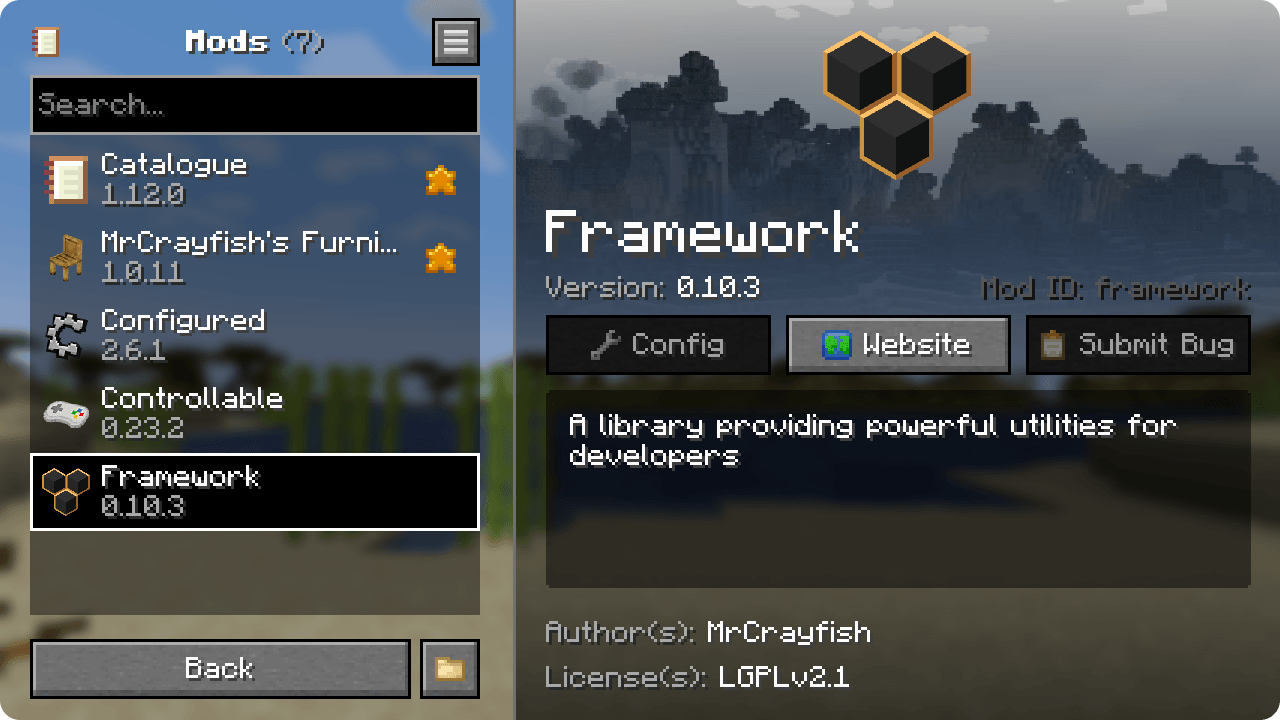
One of the standout features of Catalogue is its intuitive user interface, which allows players to easily navigate their mod list. You can filter mods based on whether they have available updates, settings, or even mark them as favorites for quicker access. Additionally, by right-clicking on a mod, you can view its dependencies, making management easier and ensuring that your gaming experience is smooth and trouble-free.
Catalogue also automatically hides libraries added by mod loaders and provides shortcuts to each mod's settings, its website, and the ability to report issues. This means you'll have everything you need at your fingertips, optimizing your time and effort while playing. Furthermore, it is compatible with the logos of Forge and NeoForge mods, as well as the icons of Fabric mods, ensuring seamless integration.
For developers, Catalogue offers additional customization options that allow control over the appearance of their mod. This translates to a coherent and appealing visual experience for both players and creators. If you are a player looking to maximize your experience in Minecraft, downloading Catalogue is a smart decision that will enable you to manage your mods more effectively.
In conclusion, Catalogue is an essential tool for any Minecraft lover using multiple mods. Its modern design and powerful features make it an indispensable ally. Don’t wait any longer, download Catalogue and take your gaming experience to the next level.
🎥 Video
Screenshots5
Main File
Catalogue 1.12.3
Recent Files
View all →Minecraft 1.21
Catalogue 1.12.3
Catalogue 1.12.3
Catalogue 1.12.3
Frequently Asked Questions about Catalogue
How to install Catalogue?
To install Catalogue, you first need to have Minecraft with Forge/Fabric installed. Download the mod's .jar file and place it in the 'mods' folder of your Minecraft directory. Restart the game and the mod will be available.
What Minecraft versions is Catalogue compatible with?
Catalogue is compatible with Minecraft versions 26.2, 26.1.2, 26.1.1, 26.1, 1.21.11.
Is Catalogue free?
Yes, Catalogue is completely free. You can download it directly from this page or from CurseForge.
Comments (0)
Did it work for you?
Tell us which Minecraft version and which loader you used (Forge, Fabric, NeoForge, Quilt). If it crashed or clashed with another mod, say so here: you will save the next reader an afternoon.
Loading comments...
🔗 Related Mods

Why it's called Puzzles, you ask? That's the puzzle!
Searchables is a library mod that adds helper methods that allow for searching and filtering elements based on components, as well as offering built in auto-complete functionality.

🎓 Collective is a shared library with common code for all of Serilum's mods.

Another library mod for mod developers

Fabric API implemented on top of NeoForge

Effekseer loader on minecraft 1.18+
Explore the full category
Explore the full category
🚀 Create your Minecraft Server
Compatible with all mods
Statistics
Downloads
46.5M
Popular Ranking
#546
Information
Created
April 4, 2021
Updated
July 10, 2026
Authors
MrCrayfish